NetFree Inspector: Diagnose filtered-page failures with precise network logs
NetFree Inspector from NetFree is a Chrome extension for diagnosing broken pages in a filtered browsing environment. It records browser network traffic and captures requests, responses, and blocked resource details so users can see which scripts, images, stylesheets, or API calls the filter prevents and why. The extension offers real-time recording, HTTP/HTTPS status logging, clear identification of blocked files, and a simple report builder connected to NetFree's ticketing system. It serves NetFree subscribers and non-technical users who need precise evidence to request unblocking from administrators.
What the Inspector makes visible about blocked page elements
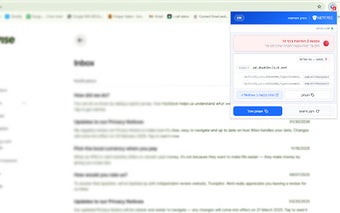
The Inspector records browser network traffic and surfaces the exact resources affected by the filter, so users see which requests fail. It identifies blocked scripts, images, and CSS files and logs HTTP/HTTPS status codes. The extension presents captured items in a readable report; common entries include blocked script URLs, missing image files, and stylesheet load failures, which clarifies why a page renders incorrectly under the filter.
How the Inspector plugs into the unblocking workflow
The extension connects diagnostic output directly to support channels, because it has direct integration with NetFree's ticketing system. Recordings produce a report or log that can be sent to support for manual review and adjustment. That pipeline is tailored to NetFree's filtering ecosystem and is intended to give administrators the exact evidence they need to evaluate unblock requests.
How the Inspector handles captured data and user privacy
The tool captures network request data to identify blocked resources, so recordings include request and response details. The documentation warns that it is intended strictly for troubleshooting, and users should only record traffic on sites where they experience issues. This design places responsibility on users to avoid collecting unrelated sensitive traffic while using the Inspector for diagnostics.
Who benefits from the Inspector and where it stops
The Inspector is aimed at NetFree subscribers who need actionable diagnostics and at non-technical users who must report display problems, since it offers a simplified reporting interface. It runs on Chrome and other Chromium-based browsers, but it is explicitly designed to integrate only with the NetFree filtering system, so users of other filters do not gain the same support connectivity or administrative follow-up.
Practical diagnostic tool for NetFree users, limited to the NetFree process
NetFree Inspector is a practical diagnostic option for NetFree subscribers who need concrete evidence to resolve filter-related display problems. It relies on the developer's support workflow for final adjustments, so effectiveness depends on successful report submission and manual review. Users outside the NetFree ecosystem gain no benefit, but within that service the tool clarifies which resources to pursue with administrators.